A Console-Based Form

I just uploaded a Python tool called “text-prompts” that takes a dictionary, presents a list of prompts to the user, and returns a dictionary.

For more detail, go here: text_prompts.txt

Example:

    from text_prompts import text_prompts
    text_prompts({ 'prompt1': ('Prompt 1', True, None), 
                   'prompt2': ('Prompt 2', False, 'default')})

Output:

    Prompt 1 (req): first response
    Prompt 2 [CTRL+D for "default"]: second response

Result:

    {'prompt1': 'first response', 'prompt2': 'second response'}

Listing SSL Certificates for a Hostname

If you’ve configured new SSL certificates on a server, you might want to watch for them to take effect and/or verify that they’re configured correctly. You can use an OpenSSL tool to do this (there is supposed to be an underscore: “s_client”):

openssl s_client -connect <hostname>:443 -servername <hostname>

This will print a barrage of information. For the purpose indicated above, you might only be interested in the very top portion:

$ openssl s_client -connect www.google.com:443 -servername www.google.com
CONNECTED(00000003)
depth=2 C = US, O = GeoTrust Inc., CN = GeoTrust Global CA
verify error:num=20:unable to get local issuer certificate
verify return:0
---
Certificate chain
 0 s:/C=US/ST=California/L=Mountain View/O=Google Inc/CN=www.google.com
   i:/C=US/O=Google Inc/CN=Google Internet Authority G2
 1 s:/C=US/O=Google Inc/CN=Google Internet Authority G2
   i:/C=US/O=GeoTrust Inc./CN=GeoTrust Global CA
 2 s:/C=US/O=GeoTrust Inc./CN=GeoTrust Global CA
   i:/C=US/O=Equifax/OU=Equifax Secure Certificate Authority
---

Under “Certificate chain”, there will be a list of all the certificates you’ve configured for the hostname. For example, if you configure one certificate (for a well-known authority) there will be one item, or if you configure a regular and an IA certificate (for lesser known authorities), there will be two.

The item (0) applies to your hostname, and each subsequently higher certificate represents a higher certificate authority. The last line of each item matches the first of the next item.

Password Strength Checking in Python

I’ve recently uploaded a tool to check password strength in Python. Prior, it seems like the only options that existed were to call cracklib via ctypes or using django-passwords, which, obviously, only works in the context of Django.

I took django-passwords and modified it to work as a library. It works as four separate validation classes:

  • LengthValidator: Check if between minimum and maximum lengths.
  • ComplexityValidator: Check for a minimum of certain character classes.
  • DictionaryValidator: Check if a password exists within a predefined list.
  • CommonSequenceValidator: Check is a password is a alphabetic, numeric, etc.. sequence.

Example of usage:

# See example for more information.

from password_check import ComplexityValidator, ValidationError

complexity = { # A minimum of N upper-case letters.
               "UPPER": 2,
               
               # A minimum of N lower-case letters.
               "LOWER": 2,
               
               # A minimum of N digits.
               "DIGITS": 2,
              
               # A minimum of N punctuation characters.
               "PUNCTUATION": 2,

               # A minimum of N non-ASCII characters ("\xx")
               "NON ASCII": 0,

               # A minimum of N space-separated, unique words.
               "WORDS": 0 }

complexity_validator = ComplexityValidator(complexity)

# Throws ValidationError due to several violations.
complexity_validator('simplepassword')

For more examples, go to the link, above, and look at the example script.

Putting PyPI Download Counts on Your Webpage

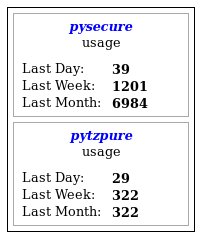
I just uploaded a jQuery widget to allow the download counts for a PyPI package to be displayed on a webpage.

PypiStats Example Image

Place a tag like the following:

<div id="pypi-display-pysecure" data-package="pysecure"></div>

Invoke the “pypi” plugin:

$("#pypi-display-pysecure").pypi()

That’s it.